
BrainDiver App
Introduction
Most productivity and self-tracking tools are built on a set of assumptions that don't quite hold up for everyone. They assume you can decide to do something and then simply do it. They assume tracking your habits will motivate you to keep going. They assume streaks are encouraging rather than anxiety-inducing.
For people with Pathological Demand Avoidance, or PDA (a profile characterised by an intense, nervous-system-level resistance to perceived demands), these assumptions don't just fall short, but they actively make things worse. The very act of being told what to do, even by your own to-do list, can trigger avoidance. Habit trackers become sources of shame. Productivity apps become one more thing to avoid.
BrainDiver is my answer to that problem. It's a personal journaling and introspection app built with Flutter for iOS, designed specifically for high-masking autistic adults with PDA traits. Rather than trying to optimise productivity, it helps you track your daily patterns (mood, energy, masking levels, avoidance, self-care) and uses AI to surface insights about how your brain actually works. No streaks, no shame, no demands.
I designed and built this entire app myself as a passion project, using AI-assisted development (hello, vibe-coding!) to handle the engineering side. It started life as a Notion dashboard with n8n automations and has since evolved into a full native app prototype with local-first storage, cloud sync, and a Claude-powered chat assistant that can reference my own data.
This case study walks through how BrainDiver works, the design and technical decisions behind it, and where it's heading next.
Slide 1 of 4
Where it started
Before BrainDiver was an app, it was a Notion dashboard.
I'd spent years cycling through productivity tools (ClickUp, Asana, Toggl, bullet journals, pomodoro timers, and various paid Notion templates), each one promising to be the system that would finally help me get things together. Each one eventually became another thing I was avoiding. The problem wasn't a lack of willpower or the wrong app; it was that these tools were all designed around the same neurotypical assumptions about how people get things done.
So I built my own system using Notion as the foundation and n8n for automation, called 'BrainDiver'. It’s a personal operating system for tracking and understanding my neurodivergent patterns.
This original Notion version centres around a few interconnected systems: a universal event log that captured everything (mood, energy, avoidance, self-care) into a single flexible database rather than forcing me to categorise before I'd even started; a daily log that synthesised each day's data into a gentle container for reflection; and a pattern recognition layer where AI-generated and manual observations can live side by side.
The automation layer was where it got really cool (if I do say so myself). Every Sunday morning, an n8n workflow would pull the past week's daily logs, send them to Claude, and generate a structured weekly insight, including my energy patterns, PDA clusters, wins, and a pair of "curiosity quests" to explore the following week. The insights populated directly in the Notion hub, ready for when I woke up.
The whole thing was personal, included a tonne of whimsical elements and was intended to be exceptionally useful. It helped me spot patterns I'd never have noticed on my own, like how creative stagnation almost always predicted a shutdown in the next day or two or how context switching drained more energy than I'd ever realised.
But Notion has its limits, and my creativity does not. I wanted something even cooler, more portable, a lot harder to build and fit-for-purpose, so I decided to turn BrainDiver into a native iOS app using Flutter.
Note: I wrote about the Notion version in much more detail as a separate essay on my Substack. You can read it here.
The Flutter iOS App
The tech stack
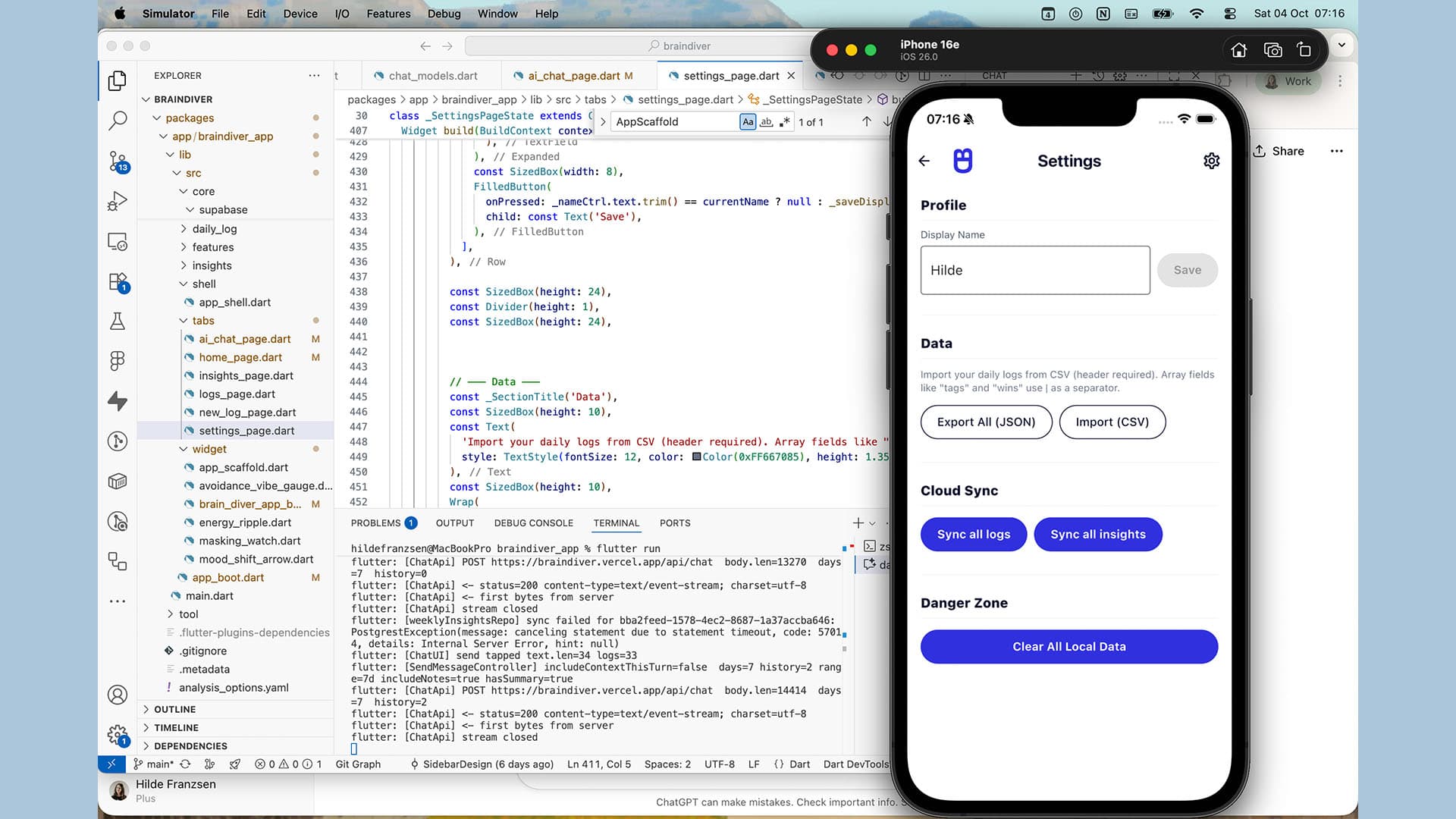
BrainDiver is built with Flutter, Google's cross-platform UI framework, targeting iOS first. Here's how the pieces fit together:
Flutter handles the entire front-end. Every screen, interaction, and animation is written in Dart (Flutter's programming language) and compiled to a native iOS app (I’m building it in VS Code and XCode).
Riverpod manages state across the app. In simpler terms, it's the system that keeps track of what data is where, making sure that when something changes (like saving a new log), every part of the app that cares about that data updates automatically.
Hive provides local-first storage. All data (logs, insights, chat history) is saved directly on the device in encrypted storage, with the encryption key held securely in the iOS Keychain. This means the app is fast and functional even without an internet connection, which matters a lot when you're trying to capture something quickly on a low-capacity day.
Supabase handles cloud sync and the remote database. It mirrors the local data to a Postgres database in the cloud, secured with Row Level Security so that only your data is accessible to you. Sync happens automatically when the app is open, with a manual "Sync now" option in Settings for peace of mind.
Vercel hosts the serverless backend as the lightweight functions that sit between the app and the AI layer. These handle the weekly insight generation and the chat assistant, keeping the API keys securely server-side rather than bundled into the app itself.
Claude (Anthropic's LLM) powers the AI features: generating structured weekly insights from the log data and providing an interactive chat assistant that can reference my daily entries.
The overall philosophy is local-first: capture is always fast and available regardless of connectivity, and sync happens in the background when it can. This was a deliberate choice so that on days when my capacity is low, the last thing I need is a loading spinner standing between me and a two-second mood check.
Design decisions
BrainDiver's visual identity needed to do a specific job: feel calm enough to open on a hard day but interesting enough that it doesn't become boring (because a bored PDA brain is a brain that stops showing up).
I built the palette around cool blue tones: a deep on-brand blue (#3030de) paired with a dark ink (#070e2d) on white. The effect is clean and steady without feeling clinical. Blue was a deliberate choice: it reads as calm and low-pressure, which matters when the app is asking you to reflect on things like avoidance patterns and masking levels. It was crucial for the interface to not add tension to the process.
For the backgrounds, I introduced subtle, abstract science-inspired imagery as a slightly whimsical nod to the idea that you're exploring and observing your own brain. It gives the app a bit of personality without competing with the content.
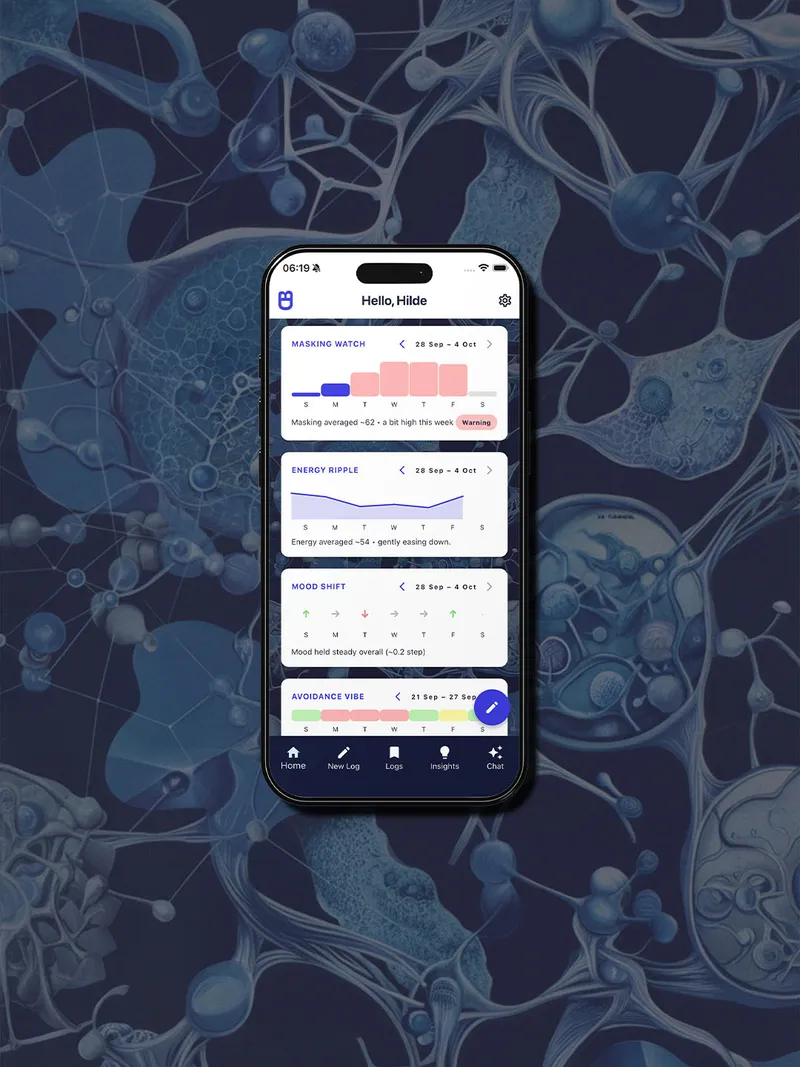
The layout leans heavily on cards. Each screen uses card-based containers to break information into digestible, self-contained pieces rather than presenting everything as one long scroll. The home screen in particular uses this to good effect by showcasing a compact insight preview, a re-rollable "win of the week", and the dashboard widgets that all sit in their own cards so you can take in what you need and ignore the rest.
The dashboard widgets are where the colour palette opens up a little. Alongside the brand blue, I brought in soft pastels (a gentle green, a warm yellow, and a light pinkish tone) to differentiate between data types and severity levels without relying on harsh colour contrasts. The masking watch widget, for example, uses the brand blue for normal-range days and a soft red to flag when masking has been running high (this way it's just a nudge and not a glaring alarm).
Beyond colour, the broader UI principle was simplicity. Fields are clearly labelled, sections are separated with clean dividers, and nothing is visually competing for attention. Sliders have numeric inputs alongside them for precision. Empty states are gentle and non-pushy. The goal was an interface that feels spacious rather than sparse (and one that a tired, overstimulated brain can navigate without additional cognitive load).
Slide 1 of 6
Daily logs
The daily log is the core of BrainDiver. It's a structured form for capturing a snapshot of your day across several sections:
Self-state covers the internal metrics: morning mood and bedtime mood (both on a 1–5 scale), energy level (0–100), masking level (0–100), social battery remaining (0–100), and skin picking intensity (0–100). These are captured via sliders with numeric inputs alongside them, so you can be as precise or approximate as you like.
Self-care is a set of simple checkboxes for things like teeth brushed, showered, hair washed, and went outside (plus a conditional text field that appears if you tick "went outside" to note what the outing was). There's also a coffee counter. These might seem trivial, but for neurodivergent people, tracking basic care tasks without judgement is genuinely useful data. A week where you didn't shower much isn't a moral failing but offers valuable information about your capacity that week.
Avoidance captures the day's overall avoidance vibe (low, medium, or high) along with free-text fields for accidental avoidances (things you unintentionally avoided) and active avoidances (things you deliberately avoided). Separating these two is important because there's a meaningful difference between "I forgot to reply to that email" and "I saw the email and chose not to open it."
Wins and notes round out the log. Wins are individual text fields (you can add as many as you want), and notes is an open free-text area for anything else worth capturing. Nothing in the entire form is mandatory. You can fill in everything or literally just one slider and hit save.
Each day gets one log entry. The app enforces a one-per-date rule, so if you return to the same day, you'll edit the existing entry rather than creating a duplicate. Logs are searchable by keyword, filterable by date, and grouped by month in the log history view.
Weekly insights
Weekly insights are where the daily data becomes interesting. Once you have at least three daily log entries for a given week, you can generate an insight: a structured AI-powered (Claude is the powerhouse) analysis of your patterns for that period.
The app sends a compact summary of the week's logs to a serverless function on Vercel, which forwards it to Claude with a carefully designed prompt. Claude returns a structured JSON response that gets parsed into distinct sections:
- Big picture: a high-level narrative of how the week went.
- Energy patterns: trends in energy, what drove dips or peaks.
- PDA clusters: where avoidance showed up and what might have triggered it.
- Vibe evolution: how your overall emotional state shifted across the week.
- Wins overview: a summary of what went well, even the small things.
- Deep patterns: longer-term correlations the AI has noticed across your data.
- Curiosity quests: two gentle, exploratory prompts for the coming week (things to notice or try, not tasks to complete).
Each insight also carries a confidence label (low, medium, or high) based on how much data was available for that week. Three logs will produce a less confident insight than seven, and the app is transparent about that.
The insight detail view displays each section clearly, separated by dividers, with the option to add your own notes at the bottom. You can export any insight as a PDF, copy it to the clipboard, or share it directly via iOS's share sheet.
Insights are browsable in an index view, grouped by month with search and date filtering, so you can revisit patterns over time.
Home screen and dashboard widgets
The home screen is designed as a hub and includes a quick-glance summary of where things stand, with easy routes into the rest of the app. It greets you by name, offers primary buttons for creating a new log or viewing your log history, and surfaces a few key cards:
Last week's insight shows a compact preview with the title and the first few lines of the big picture summary. Tap it to open the full insight detail.
Win of the week pulls a random win from the previous week's logs and displays it in a card. You can re-roll it with a tap to surface a different win, and it shows the source date so you remember the context. It's a small thing, but on a hard day, being reminded that you did something worth noting last week is genuinely helpful.
Below these sit the dashboard widgets. They’re a set of compact, visual cards that summarise your recent data at a glance:
The Masking Watch displays a 7-day bar chart of your daily masking levels. Each day is a vertical bar coloured in brand blue for normal-range values and soft red when masking hits 50 or above. If you've been running high for two or more consecutive days, a "Warning" pill appears (a gentle capacity nudge rather than an alarm). The widget is navigable by week (up to 30 days back) and shows a running average. The idea is to help you spot sustained high masking before it leads to a crash, rather than only recognising it after the fact.
The Energy Ripple shows a minimalist sparkline of your energy levels for the week, paired with a single-sentence summary like "energy drifted lower after Wednesday". It's a quick trend read without number overload, and you can tap it to open your logs filtered to that week.
The Mood Shift Arrow visualises the delta between your morning mood and bedtime mood each day (up, flat, or down arrows) alongside a 7-day average. It gives you a sense of daily swing without attaching any judgement to the direction.
The Avoidance Vibe Gauge breaks down the week's avoidance vibes (how many days were low, moderate, and high), normalising the ebb and flow of avoidance as data rather than something to feel bad about.
All of the widgets share a consistent design language: clean card containers, the brand blue palette with soft pastels for variation, and taps that either open filtered log views or simply invite you to observe. None of them demand action.
The AI layer
AI in BrainDiver serves one role: a pattern recognition assistant. It doesn't make decisions, set goals, or tell you what to do. It looks at your data and reflects back what it notices. These can be correlations, trends, and gentle hypotheses you might want to explore. The guiding principle, carried over from the original Notion version, is AI as helper, not decision-maker.
Both AI features run through serverless functions hosted on Vercel, which act as a secure middleman between the app and Anthropic's Claude. The API keys never leave the server but are rather stored as environment variables in Vercel, not bundled into the app (and all requests are validated against a schema before anything gets sent to Claude).
Weekly insight generation
The insight pipeline is the more structured of the two AI features. Here's how it works:
When you tap "Generate" (or when the automated Sunday cron job runs), the app collects the past seven days of daily logs and compresses them into a compact payload. Each day's data (mood scores, masking level, energy, avoidance, wins, care tasks, notes) gets condensed into a structured block, capped at around 3,000 characters per day to keep the total request under budget.
This payload gets sent to the /weekly-insight endpoint on Vercel, which forwards it to Claude along with a system prompt and a strict JSON schema defining exactly what sections to return. Claude analyses the week's data and responds with structured JSON containing the big picture narrative, energy patterns, PDA clusters, vibe evolution, wins overview, deep patterns, curiosity quests, and a confidence label.
The serverless function validates the response against the expected schema. If the JSON is malformed, it attempts one repair pass before failing cleanly. The validated insight then gets persisted to Supabase and synced back to the app.
There's also an idempotency layer, so if the same week's insight is requested twice (say, due to a network retry), it won't generate a duplicate. And the whole pipeline is rate-limited to prevent runaway costs.
The automated version of this runs every Sunday at 01:00 SAST via a Vercel cron job. It generates the insight server-side and sends a push notification to let you know it's ready. If your phone were offline, then the insight would just sync the next time you open the app.
Chat assistant
The chat feature is more conversational. Rather than producing a structured report, it lets you ask freeform questions about your data and get a thoughtful response in return.
Before you send a message, you choose a context window (last 7 days, last 30 days, or all time). The app then builds a compact summary of your logs for that period and includes it alongside your question in the request to the /chat endpoint. This means Claude is always grounding its responses in your actual data rather than responding generically. You might ask something like "Have you noticed any patterns between my masking levels and my energy the next day?" and the assistant will draw on your actual logged data to respond.
The chat endpoint streams its response back using server-sent events (SSE), so you see the reply being written in real time rather than waiting for a complete response to load. Conversation history can be included in follow-up messages to maintain context across a thread.
Claude's chat persona is defined by a system prompt that sets the tone: warm, concise, neurodivergent-affirming, and never prescriptive. It offers options rather than instructions, states uncertainty plainly, and always ends with an invitational follow-up question rather than a directive.
What's next
BrainDiver isn't finished yet. It's a passion project that I work on when capacity allows (usually on free weekends when my brain is up for a good hyperfocus session rather than recovering from a busy week). But that's fitting, really. An app designed around unpredictable capacity is itself being built around unpredictable capacity.
The core of the app is in place: daily logging, weekly insight generation via Claude, the AI chat assistant, dashboard widgets, cloud sync, and data export. What remains is largely polish and the final steps to get it onto my phone via TestFlight.
Longer term, I'm definitely interested in what BrainDiver could look like beyond a personal tool for others. The design principles (demand-aware architecture, failure-safe systems, genuine agency over every interaction) aren't specific to me. They apply to anyone whose brain doesn't fit the mould that most productivity tools are built around (although this isn’t a productivity tool but rather a tool for deeper understanding).
For now, though, BrainDiver is mine: a small, ongoing act (a labour of love, if you will) of building something that treats my brain as worth understanding rather than worth fixing.